Integration
NetSuite
A button on the Sales Order that packs the order and writes the plan back onto it. Installed and run against a live account on 29 September 2026.
Files
| File | What it is |
|---|---|
| cpp_lib.js | Payload, HTTP call and write-back. Required by both entry points. |
| cpp_sl_pack.js | Suitelet. Packs one order on demand and returns you to the record. |
| cpp_ue_salesorder.js | User event. Adds the button, and optionally packs new orders. |
There is no SuiteApp and no bundle. Put all three in one File Cabinet folder — the entry points require ./cpp_lib, which resolves beside them.
Before you start
NetSuite makes the outbound call, so Carton Pack Pro has to answer on a public HTTPS origin. Create an API key with write under Settings → API keys; the pack run is recorded and counts against your monthly allowance.
1. Transaction body fields
Customization → Lists, Records, & Fields → Transaction Body Fields. Applies to Sale, Display Type Inline Text.
| Name | Type | Req | Description |
|---|---|---|---|
| custbody_cpp_job_id | Free-Form Text | no | Pack job id |
| custbody_cpp_reference | Free-Form Text | no | Pack reference |
| custbody_cpp_cartons | Integer Number | no | Cartons |
| custbody_cpp_billable_weight | Decimal Number | no | Billable weight |
| custbody_cpp_plan_url | Hyperlink | no | 3D pack plan |
2. Where the SKU comes from
Whatever custscript_cpp_sku_source reads still has to satisfy the SKU rule: letters, digits and . _ - /, starting with a letter or digit, no spaces.
| Value | Reads | Use when |
|---|---|---|
name | The item's display name, parent path stripped | Your item numbers are already codes |
internalid | The item's NetSuite internal id | Anything else. Needs no NetSuite setup |
custcol_… | That line column | You have a column holding the picker's code |
An item master of names rather than codes refuses every line in name mode, and says so line by line. Load the Carton Pack Pro catalog keyed by internal id instead — SELECT id, itemid FROM item gives the mapping.
3. Upload the scripts
Documents → Files → File Cabinet → SuiteScripts. Create a folder, put all three files in it.
4. The Suitelet
Customization → Scripting → Scripts → New, upload cpp_sl_pack.js, ID customscript_cpp_sl_pack — exact, the user event builds the button’s URL from it.
| Name | Type | Req | Description |
|---|---|---|---|
| custscript_cpp_base_url | Free-Form Text | no | Carton Pack Pro base URL |
| custscript_cpp_secret_id | Free-Form Text | no | API secret script ID |
| custscript_cpp_sku_source | Free-Form Text | no | SKU source |
A parameter with no preference is a deployment parameter, read from the deployment. Set Preference to Entire Company and the value is read from Setup → Company → General Preferences → Custom Preferences instead, while the deployment still displays what you typed.

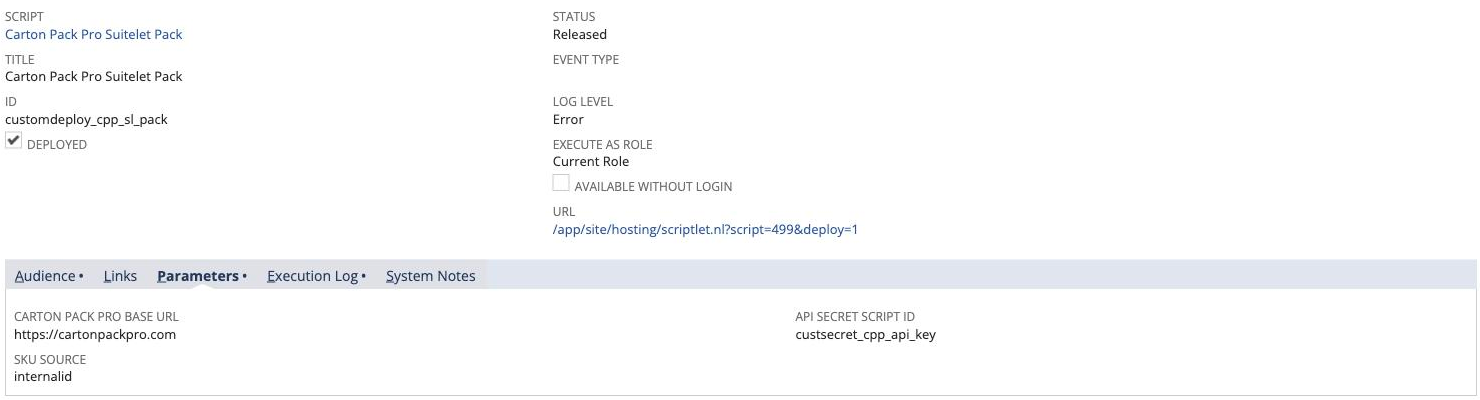
| Deployment | Value |
|---|---|
| ID | customdeploy_cpp_sl_pack |
| Status | Released |
| Audience | Roles and Employees, Select All |
| Available Without Login | off |
custscript_cpp_base_url | your Carton Pack Pro origin |
custscript_cpp_secret_id | custsecret_cpp_api_key |
custscript_cpp_sku_source | internalid |
5. The user event
Upload cpp_ue_salesorder.js, ID customscript_cpp_ue_salesorder. One parameter, not four: beforeLoad resolves the Suitelet’s URL and nothing else, and afterSubmit returns above the config read while the box is clear.
| Deployment | Value |
|---|---|
| Parameter | custscript_cpp_auto |
| Type | Check Box, Preference empty |
| Applies To | Sales Order |
| Status | Released |
| Log Level | Audit while you settle it in |
custscript_cpp_auto | unchecked for the first run |
beforeLoad also clears the five fields when an order is copied. Make Copy carries them onto the new order, so it opens naming a job that belongs to a different one, and 3D pack plan opens that order’s cartons.
6. The API secret
Setup → Company → Preferences → API Secrets → Create New. Do this after step 5 — the scripts are named here, so they have to exist.
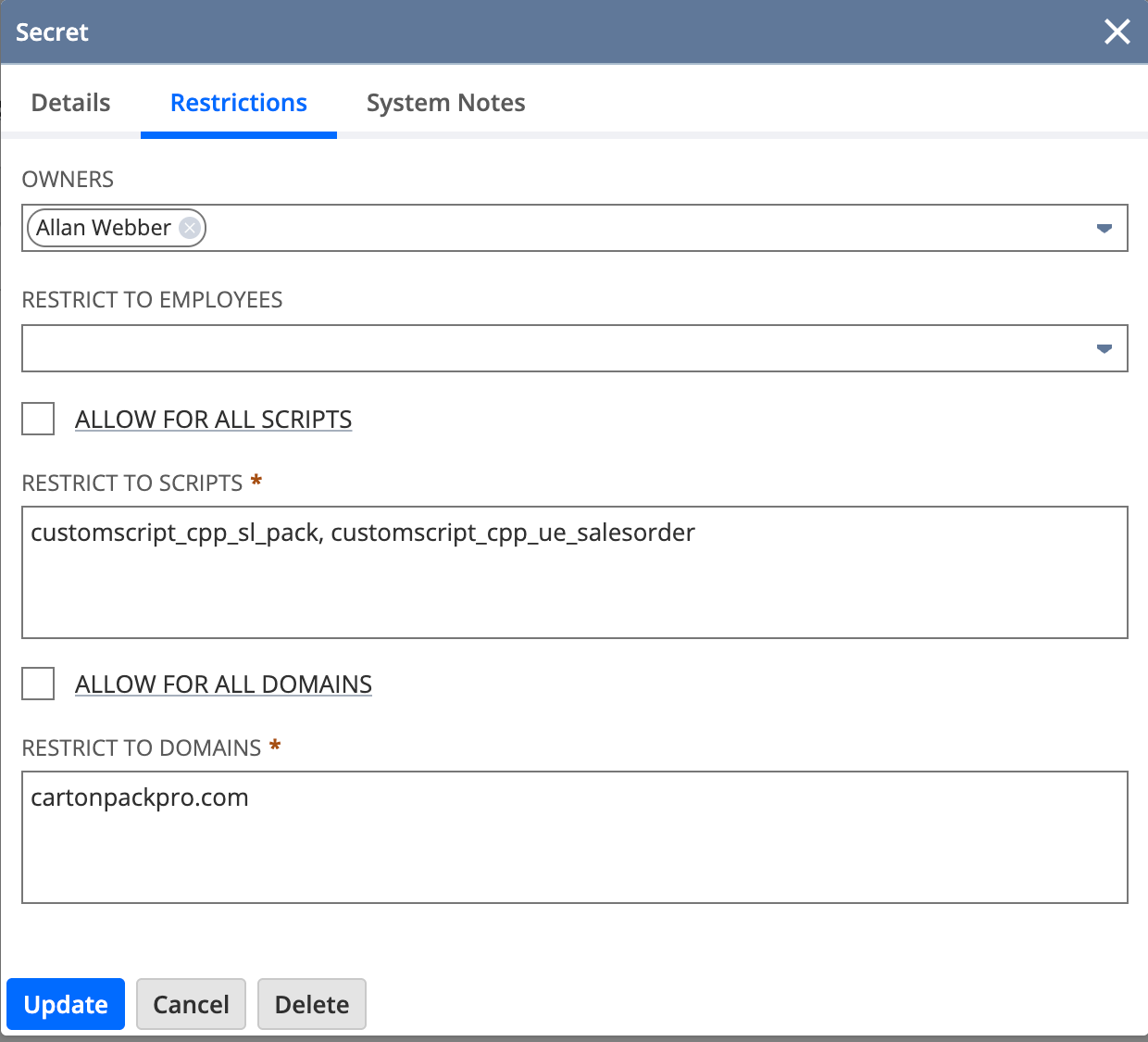
| Field | Value |
|---|---|
| ID | custsecret_cpp_api_key |
| Password | your cpp_live_… key |
| Restrict to Scripts | both script ids, comma separated |
| Allow For All Domains | clear |
| Restrict to Domains | your bare hostname, matched exactly |
The key never reaches a script parameter. cpp_lib.js builds the header and NetSuite substitutes the value as it sends:
https.createSecureString({ input: 'Bearer {custsecret_cpp_api_key}' })7. Try it
Open a sales order in View mode and press Pack this order. The page returns to the order with the five fields filled and 3D pack plan a link you can open. A failure renders the reason instead, listing mis-mapped SKUs line by line. Either way, read the deployment’s Execution Log.
Troubleshooting
| Symptom | Cause | Fix |
|---|---|---|
custscript_cpp_base_url is not set | The parameters have a Preference set, so the read goes to Custom Preferences | Clear the PREFERENCE column on every parameter |
| The same refusal, one parameter empty | Typo in that id, or the value was never saved | Compare the id; re-save the deployment |
INVALID_DOMAIN | The secret's Restrict to Domains does not match the request host | Bare hostname, exact. Not the scheme, not www. |
| Every line refused as a product name | SKU source is name against an item master of names | Set it to internalid and key the catalog by internal id |
| 401 from the API | The key in the secret is revoked, or read-only | Issue one with write under Settings → API keys |
| The order packs short | Fewer cartons than the plan needs | Expected. Compare packed units against total on the job |
Governance
https.post is 10 units and record.submitFields is 10, against a user event’s 1,000. Backfilling history is a Map/Reduce job, which can yield between records; there is no such script here.
Point a sandbox at a separate Carton Pack Pro organization. A sandbox refresh replays orders, and with custscript_cpp_auto on that spends real quota. The rest of the contract — the order document, the signed hook, the deep link — is on ERP integration.